
Unit Testing with Jest and Vitest
Before diving into unit testing using Vitest, it’s essential to grasp the concept of test doubles, including spies, stubs, and mocks.
Understanding test doubles is pivotal to mastering unit testing, particularly with Vitest. Unit testing primarily revolves around these concepts. While well-crafted code may not necessitate extensive mocking, complex or tightly coupled code often requires mocking multiple pieces. This not only adds complexity to testing but also makes test maintenance more challenging. Every time you test a code piece, you must mock all the dependent elements.
To streamline your unit testing process and enhance maintainability, I strongly recommend writing code in a way that minimizes the need for extensive mocking, especially when using Vitest.
Test Doubles Demystified
Let’s delve into the realm of test doubles, often collectively referred to as Spies, Stubs, and Mocks.
- Spies are akin to silent observers, recording data related to the usage of a function without meddling in its implementation.
- Stubs serve as stand-ins, replacing the behavior of a function with predefined values. They offer control over the function’s output and can prevent it from interacting with external dependencies.
- Mocks combine the best of both worlds, incorporating features of spies and stubs. Frequently used to verify specific conditions, mocks ensure that a function is called a designated number of times with predefined arguments and that it returns the expected value.
Understanding these test doubles is fundamental to navigating the landscape of unit testing with confidence and precision.
Mocking an Object imported by a Module
Consider a scenario in an eCommerce app where logging incurs a cost e.g. you are using a third-party service, and you want to ensure efficient unit testing. Let’s explore how to mock the logger, specifically using Vitest in this case.
Firstly, assume you have implemented a logger using winston, which you import into your code:
import { createLogger, format, transports } from "winston";

const { combine, timestamp, label, prettyPrint } = format;

const logger = createLogger({
  level: "debug",
  format: combine(label({ label: "debug" }), timestamp(), prettyPrint()),
  transports: [new transports.Console()],
});

export default logger;
Now, let’s say you have a cart functionality where adding an item triggers a log:
import logger from "./logger";

export const cart: Map<string, number> = new Map();

export function addToCart(item: string, quantity: number) {
  const currentQuantity = cart.get(item) || 0;
  const newQuantity = quantity + currentQuantity;
  cart.set(item, newQuantity);
  logger.info(`Item: ${item} added to the cart with the quantity: ${newQuantity}`);
}
As you can see I am importing logger module inside the cart. Now we want to mock the logger. The benefit here is that we don’t need to mock the underlying logger service e.g. winston in this case. Because we are not using winston directly in the cart. So we just need to mock the logger module itself.
import { test, vi } from "vitest";
import { addToCart } from "../service/cart";
import logger from "../service/logger";

test("add to cart logging", () => {
  vi.spyOn(logger, "info");
  addToCart("a", 1);
  console.log(logger.info);
});
If we log the logger.info, we would see the spy function instead of actual function because we are spying the logger.info function as you can see in the screenshot below.
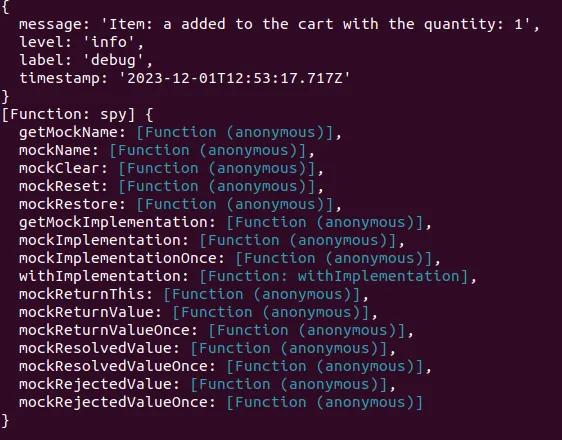
By spying on logger.info , you effectively call the actual implementation, allowing you to track information such as the number of calls and arguments. Vitest does not override the actual implementation, unlike some other testing libraries.
Replacing Spy with Stubs
In scenarios where you directly use third-party modules in your code, referencing them in the source file, you may encounter challenges when it comes to mocking. Here’s an approach to address this, considering the use of Vitest.
Assume you have a file (cart.js) where you directly reference the Winston logger:
import { createLogger, format, transports } from "winston";
const { combine, timestamp, label, prettyPrint } = format;

export const logger = createLogger({
  level: "debug",
  format: combine(label({ label: "debug" }), timestamp(), prettyPrint()),
  transports: [new transports.Console()],
});

export const cart: Map<string, number> = new Map();

export function addToCart(item: string, quantity: number) {
  const currentQuantity = cart.get(item) || 0;
  const newQuantity = quantity + currentQuantity;
  cart.set(item, newQuantity);
  logger.info(`Item: ${item} added to the cart with the quantity: ${newQuantity}`);
}
To mock the import and facilitate testing, consider refactoring your code by moving the logger to a separate file is not a good use-case if you have some kind of legacy code. Now, you can mock the import using Vitest, as illustrated below:
import { expect, test, vi } from "vitest";
import { addToCart, logger } from "../service/cart";

vi.mock("winston", () => ({
  createLogger: vi
    .fn()
    .mockImplementation(() => ({ info: vi.fn(), debug: vi.fn(), error: vi.fn() })),
  format: {
    combine: vi.fn(),
    timestamp: vi.fn(),
    label: vi.fn(),
    prettyPrint: vi.fn(),
  },
  transports: {
    Console: vi.fn(),
  },
}));

test("add to cart logging", () => {
  addToCart("a", 1);
  expect(logger.info).toHaveBeenCalledWith("Item: a added to the cart with the quantity: 1");
});
This approach allows you to easily extend the mock implementation. For instance, if you need to mock the return value of logger.info, you can further customize the behavior in your tests:
test("add to cart logging", () => {
  (logger.info as Mock).mockImplementation(() => "Logger Mock Behaviour");

  addToCart("a", 1);
  expect(logger.info).toHaveBeenCalledWith("Item: a added to the cart with the quantity: 1");

  console.log((logger.info as Mock).mock.results); // [ { type: 'return', value: 'Logger Mock Behaviour' } ]
});
In this way, Vitest empowers you to create high-level spy functions through vi.mock(), and if necessary, you can further extend and customize the mock behavior in specific unit tests. Because you’d already mock the logger above and now for specific unit tests you can extend it to anything that tests required.
Restoring Original Implementation with Vitest
When you engage in mocking during your tests, it becomes crucial at times to restore the original implementation or, at the very least, reset the call records. This ensures that the mocked behavior doesn’t interfere with other unit tests once they are completed.
Vitest provides three helpful helpers for managing mocks:
- mockClear: This erases a test double’s record, but it remains a spy. It’s useful when you want to reset the call records but retain the spy functionality.
- mockReset: Use this to erase a test double’s record and any mocked behavior. It still retains its spy nature. This is similar to when you use vi.spyOn(logger, “info”) without employing mockImplementation or other similar utilities.
- mockRestore: If you wish to completely restore the actual implementation, erasing a test double’s record in the process, you should invoke mockRestore.
These helpers can be conveniently called in hooks like afterEach or afterAll, wherever their application is most relevant. To avoid repetitive calls in every unit test file, you have the option to centralize these calls in the vitest.config.js file. This ensures an automatic reset, making your testing workflow more efficient and less prone to manual oversights.
Conclusion
In conclusion, mastering unit testing with Vitest involves understanding the core concepts of test doubles — spies, stubs, and mocks. These tools are instrumental in ensuring effective testing, especially in scenarios where code complexity or tight coupling requires careful consideration. Vitest’s flexibility allows you to seamlessly mock imports, facilitating efficient testing of third-party modules. Additionally, Vitest provides handy helpers for restoring mocked implementations to their original state, promoting a clean and reliable testing environment. By incorporating these practices, you can enhance the precision and ease of your unit tests with Vitest.